Skip to content
Introducing 2.0 Alpha

A Windows desktop
2D game engine
built for staying in flow.

Visual editor, 33+ no-code behaviours, visual state machines, navmesh AI, tilemap studio, timeline animation, quests, inventory, a full visual novel system, and sandboxed C# plugin scripting — all in one native desktop app.

Currently in 2.0 Alpha · Linux and macOS to follow Windows · Free Edition on itch.io

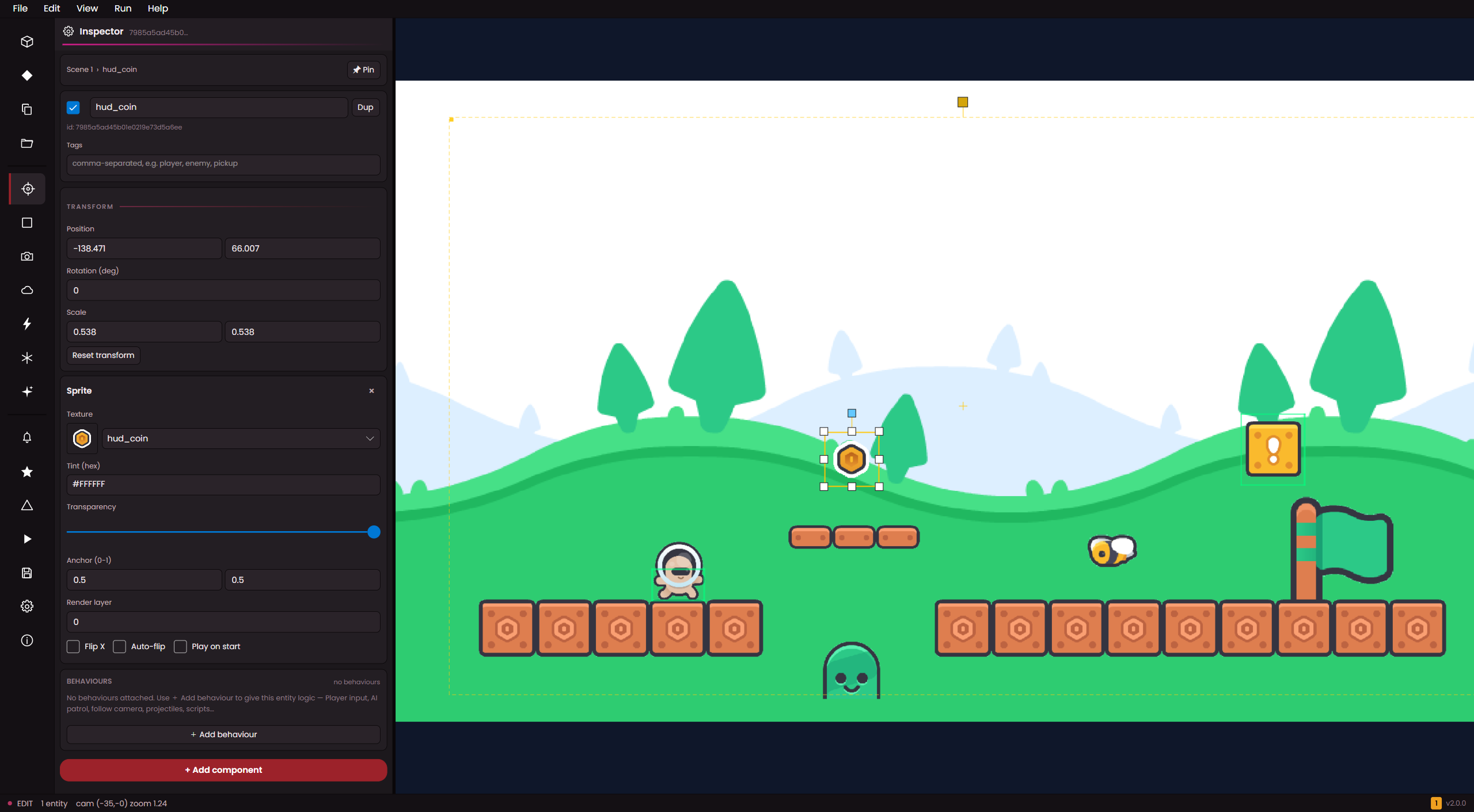
ArcadeOn Engine editor with a platformer scene open, the Inspector panel on the left editing a selected coin sprite, and a player astronaut, coins, a bee and a flag in the viewport
33+
Built-in behaviours
13
Entity components
18
Editor panels
~100
Event commands
What's in the box

Built for 2D — properly

Every screenshot below is from the actual editor. No mockups, no roadmap promises — these are the tools shipping in the 2.0 Alpha.

Editor ArcadeOn Engine editor with the Inspector panel open on a selected coin sprite and a platformer scene of an astronaut, coins, a bee and a flag in the viewport

A friendly visual editor

Drag a sprite into the scene, tweak it in the inspector, press Play. Move panels where you like, undo any mistake, drop in art and audio and they show up instantly. Hit Ctrl+P to find any command.

Drag & dropPress PlayUndo anything
Assets Assets panel listing sprite thumbnails on the left with a character sprite selected in the platformer viewport, plus an Open Animation Studio button

Drop in art and audio

Drag new sprites or sound into your project folder and they appear in the Assets panel instantly. Audio is auto-converted to a compact format, and the Asset Doctor catches anything broken or missing.

Live folder watchAuto-convert audioAsset Doctor
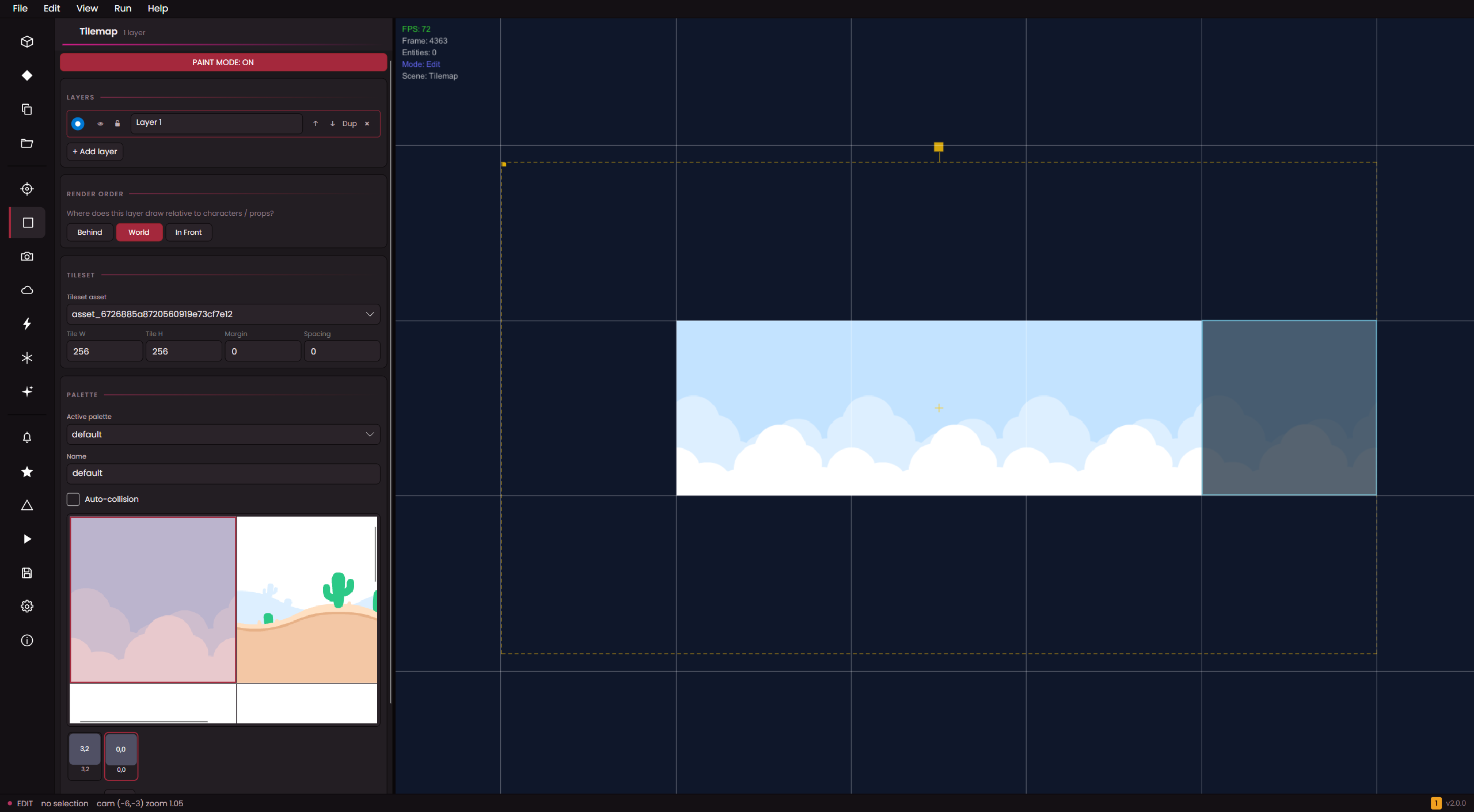
Tilemap Full-screen Tilemap Studio with layer, render-order and tileset controls on the left and cloud tiles painted onto a grid canvas

Paint worlds in Tilemap Studio

A full-screen canvas with brush, fill, rect and line tools, per-stroke undo, and tile-size presets. Pick each layer's render band so tiles weave in and out of your entities — no flat single-layer ordering.

Brush & fillLayered bandsPer-tile collision
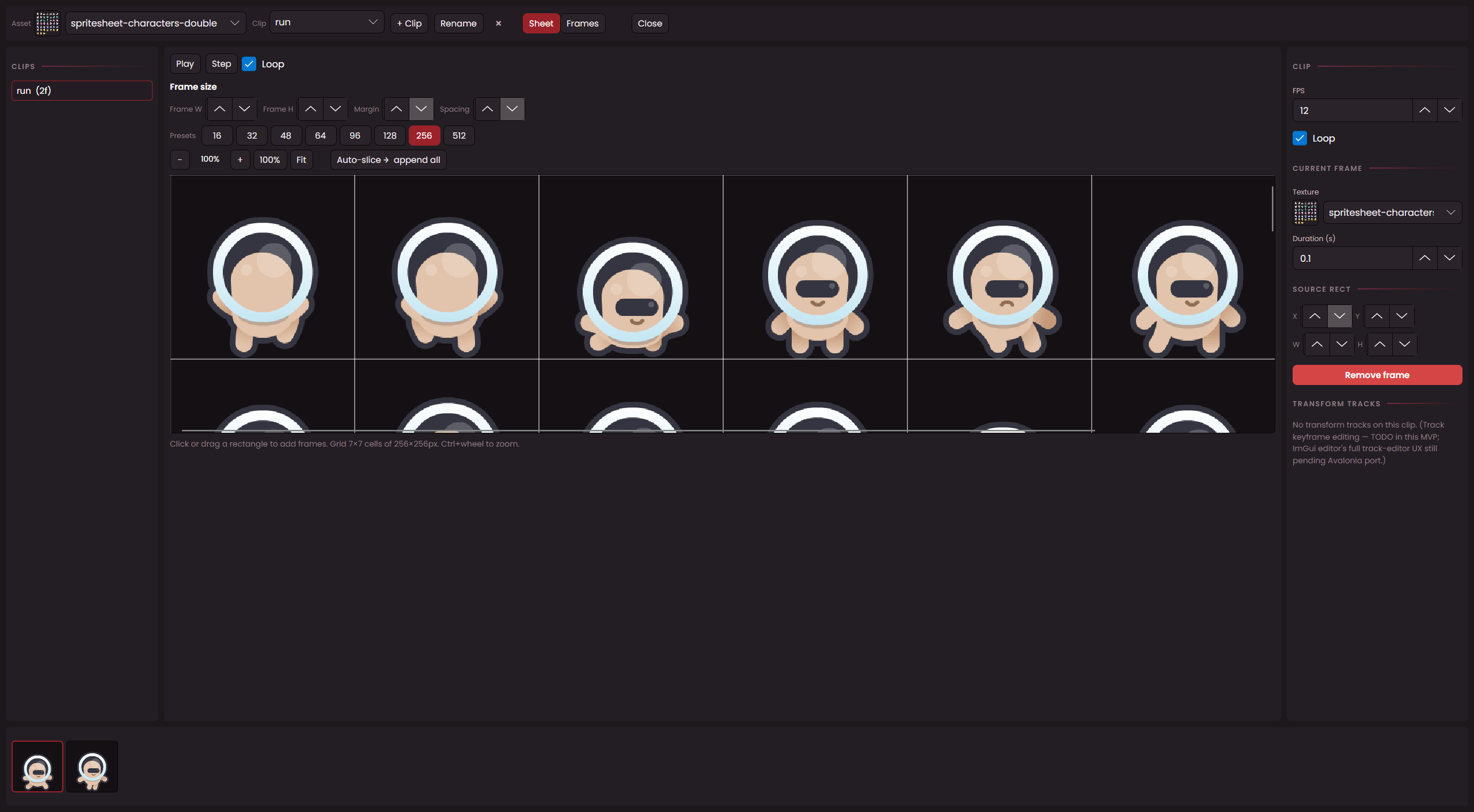
Animation Animation Studio showing a sprite sheet of an astronaut character split into frames with clip, loop and FPS controls

Bring sprites to life

Slice a sprite sheet into frames, set the FPS, choose whether it loops, and scrub a live preview. Keyframe position, rotation and scale on the timeline — with a safe fallback if a clip ever goes missing.

Sprite sheetsLive previewKeyframes
Logic State Machine panel with a node graph linking a trigger to a gotoscene state, a state list, and the platformer scene in the viewport

Visual state machines

Give each entity named states — Idle, Walk, Attack, Hurt — and wire transitions with conditions and priority on a pan-and-zoom graph. Run actions on enter or leave, and auto-assign an animation per state.

Named statesConditional transitionsGraph canvas
Scripting Scripts panel with a C# Pulse Scale script open in the code editor next to a platformer scene with a bee entity selected

C# scripting when you need it

When 33+ behaviours aren't enough, attach a per-entity C# script. It compiles live in the editor — no rebuild step — and runs sandboxed, so scripts can't touch the file system, network or OS internals.

Live compilePer-entitySandboxed
UI UI Designer building a Main Menu with a Hello world! label and a Main Menu button laid out over the game scene

Design menus and HUDs

Lay out title screens, menus and overlays visually with labels and buttons. Wire button actions to send a signal, jump to a scene, or set a variable — then reuse a scene as a permanent HUD across your game.

Buttons & labelsWired actionsHUD overlays
Visual novel VN Studio with a Narrator character set up, an orc warrior portrait on stage and a Once upon a time… dialogue box at the bottom

A full visual novel system

Branching dialogue with choices, a typewriter effect and a 200-line backlog. Place character portraits, set variables and emit signals, and theme bubbles, positions and choice styling across 50+ knobs.

Branching choicesPortraitsThemeable
Themes Preferences panel open on the Theme tab with theme swatches, spacing options and a UI scale slider, the editor shown in a blue theme

Make the editor yours

Seven themes — including animated brand colours and dark / OLED options — plus a live UI scale slider and Compact, Default or Spacious spacing. Set it once and the whole workspace follows.

7 themesUI scaleSpacing presets
Everything in the alpha

All features

Everything you can do with the 2.0 Alpha — grouped by what you'll use it for.

What's inside every game

Scenes & entities

  • Build your game across as many scenes as you want — switch between them in a click
  • Every game object (an "entity") can be tagged, parented to others, and shown or hidden
  • Group enemies, props or pickups with tags so events can find them instantly
  • Drop spawn points where you want characters to appear at runtime
  • Three starter templates: Blank, Top-Down, and Platformer
  • Make a prefab once, drop in copies, override just the bits you want different

Building blocks 13

  • Transform — position, rotation, scale
  • Sprite — image, tint, transparency, auto-flip when moving
  • Tiled Sprite — a repeating texture (great for floors and walls)
  • Render layer — Background, World, Foreground, UI
  • Collider — rectangle, circle or triangle hitboxes
  • Rigidbody — gravity, mass, drag, ground detection
  • Audio — attach a sound to an entity, with looping
  • Particles — fire, smoke, sparks, magic — fully tweakable
  • Light — coloured lights with flicker, pulse, glow and softness
  • Line — draw a coloured line between two points
  • Timeline — keyframed animation clips
  • Events — visual logic pages (triggers, conditions, actions)
  • State Machine — named states and transitions per entity

Behaviours 33+

  • Player movement: top-down, grid-based, touch-to-move, virtual joystick, platformer (with double-jump), racing
  • Enemies: wandering, chase, patrol, grid-based, platformer, racing, shooting
  • Combat: health and damage, knockback, projectiles, click-to-destroy
  • Camera: smooth follow with offset, or animated rigs driven by timelines
  • Animation: hold-to-play, press-to-trigger, auto walk / jump / fall by velocity
  • Movement helpers: rotate towards a target, rotate to mouse, parent to another entity, destroy after time
  • AI & pathfinding: waypoint nav, nav-mesh agent, steering (seek, flee, wander), behaviour trees
  • Extras: ragdoll physics, plus per-entity C# scripting when you need it

Animation

  • Frame-by-frame sprite animation from sheets or individual images
  • Set the speed (FPS) and whether the clip loops
  • Animate position, rotation and scale with keyframes
  • Safe fallback if a clip is missing — your game won't crash
  • Animation Studio with a live preview canvas and transport controls

Physics & collision

  • Rectangle, circle, and polygon hit detection
  • Tilemap layers can be marked solid for walls and platforms
  • Smooth wall-sliding for player controllers (no sticking in corners)
  • Fast under the hood — handles lots of entities without slowing down

Pathfinding & AI

  • A* grid pathfinding — diagonals optional, won't cut corners through walls
  • Or use a nav-mesh of linked waypoints for open worlds
  • Line-of-sight checks so AI can spot the player
  • Nav agents auto-recover if they get stuck on geometry
  • Three movement modes: grid, mesh, or straight-line direct

Graphics & lighting

  • Sort sprites and tilemap layers onto four bands (Background, World, Foreground, UI)
  • Tilemap layers interleave with entities at each Z band — no more flat single-layer ordering
  • Coloured lights with soft falloff, glow, flicker and pulse
  • Ambient fill, vignette, bloom and grain post-effects
  • Particle effects — fire, smoke, sparkles, magic
  • Built-in weather: rain (wind-blown) and snow (drifting)
  • Parallax background layers with per-layer scroll speed and tiling
  • Crisp text rendering at any size, falls back to your OS font

Audio

  • Per-scene music with smooth crossfades
  • Drop in MP3, M4A, AAC, FLAC, Opus or WAV — converted automatically
  • Per-entity sound loops for ambience and effects
  • Master / Music / SFX volume sliders and a global mute
  • Music ducks under menus and dialogue automatically
  • Audio pauses when the window loses focus (no surprise blasts on alt-tab)

Input

  • Keyboard, mouse and up to 4 gamepads — all supported out of the box
  • Input buffering so quick presses still land (great for platformers)
  • Named actions ("jump", "fire") that map to any key or button
  • Players can re-bind controls in-game and their choices persist

Dialogue & visual novel

  • Branching dialogue with multiple choices and conditional branches
  • Typewriter text effect — space to fast-forward or advance
  • 200-line backlog so players can scroll back
  • Character portraits with smart fallbacks if an art file is missing
  • Visual-novel commands: set variables, branch, wait, jump, emit signals
  • Themeable dialogue bubbles, portrait positions, choice styling and more (50+ knobs)

Quests & inventory

  • Quests with Inactive / Active / Completed / Failed states
  • Objectives that complete manually or automatically based on conditions
  • Toast notifications when quests start, progress or finish
  • Inventory items with name, quantity and custom data fields

Menus & saves

  • Build your title screen visually — buttons, music, background
  • Button actions: send a signal, go to a scene, set a variable or switch
  • Multi-slot save / load menus with timestamps and scene names
  • Use a scene as a permanent HUD overlay across your game

Events — visual logic

  • ~100 ready-made actions across 13 categories: flow control, entity tweaks, variables, sound, screen effects, dialogue, signals, timelines, tags, tweens and more
  • Conditions: switches, variables (6 comparisons), with AND / OR / NOT combinations
  • Triggers: button press, touch, scene start, signal, timer, on collide, on destroy, on create
  • Switches and variables persist when you change scenes
  • Live debug overlay so you can watch logic run as you play

State machines

  • Give each entity named states (Idle, Walk, Attack, Hurt…)
  • Run actions when entering or leaving a state
  • Transitions with conditions and priority
  • Auto-assign a sprite animation when a state is entered
  • States reset cleanly every time you press Play

Languages & save files

  • Translate your game with key-based locale tables and live switching
  • Import / export translations as CSV for your translators
  • Save files capture switches, variables, inventory, quests, scene and music
  • Atomic writes — saves can't be corrupted mid-write
  • Crash-autosave fallback so progress isn't lost on a hard exit
  • Automatic interval saves plus snapshots when you press Play / Stop

Asset pipeline

  • Drop new art or audio into your project folder — it appears in the editor instantly
  • Audio is auto-converted to a compact, ready-to-play format
  • Asset Doctor finds broken or missing references and can clean them up
  • Atlas Packer combines sprites into a single texture for better performance
  • ~10× audio compression with no quality fuss

Scripting & plugins

  • Add per-entity C# scripts when behaviours aren't enough
  • Live in-editor compile — no rebuild step
  • Sandboxed: scripts can't touch the file system, network or OS internals
  • Install, enable and update plugins per project

Camera & under-the-hood

  • Smooth follow camera with deadzones and world bounds
  • Reference entities by tag (tag:player) so refs survive scene reloads
  • Editor camera and runtime camera kept separate so previews don't fight
  • Ctrl + mouse-wheel zoom anchored at the cursor
  • Debug overlay with FPS, entity count, and warning / error log
  • Atomic file writes everywhere — your project files stay safe

The editor

The workspace

  • Native Windows chrome — real title bar, menu bar, and OS file dialogs
  • Left-rail icon strip — click any icon to open its panel, click again to close
  • Drag the splitter to make a panel as wide as you need; viewport always fills the rest
  • Seven themes including animated brand colours and dark / OLED options
  • Live UI scale slider (85% – 150%) and Compact / Default / Spacious spacing
  • Per-project autosave at an interval you choose
  • 50-step snapshot undo so you can always go back
  • Crash recovery — if the editor closes unexpectedly, your work is waiting next launch

Menus & transport

  • File, Edit, View, Run and Help menus with the standard Ctrl+N / O / S / E shortcuts
  • Play (F5), Pause (F7), Step one frame (F8), Run in the standalone runtime window (F6)
  • Frame All or Frame Selected (F), Reset Camera (Home)
  • Toggle the rail with F2 to give the viewport every pixel; Alt+Enter or F11 for fullscreen
  • Command Palette (Ctrl+P) — fuzzy search across every editor action
  • Keyboard Shortcuts cheatsheet (F1) — every binding in one place

Working in the viewport

  • Click and drag with 8 handles to resize, plus a floating rotate handle
  • Box-select multiple entities, Shift / Ctrl to add or remove
  • Drag a group together; Ctrl+drag to duplicate; Alt+drag to stamp out a row of clones
  • Snap to other entities, the camera frame, or world origin (hold Shift)
  • Pan with middle-click, spacebar+drag, or hold the right mouse button; right-click taps open a context menu
  • Drag art straight from the Assets panel into the scene
  • A visible border and banner make it clear when you're in Play mode

Status bar

  • Live status readout — mode, selected entity, FPS and project name
  • Warning and error badges — click either to jump straight to the Output log
  • Brand accent watermark with a subtle pulse, plus the engine version
  • Autosave status (“saved 12s ago”, “saving…”, “disabled”) right where you expect it
  • Centre slot reserved for transient toasts so they don't fight the persistent readout

Panels 18

  • Hierarchy, Scenes, Instances and Assets — your scene and project tree
  • Inspector with breadcrumb header, multi-entity bulk edit and per-component cards
  • Tilemap, Parallax and Weather — author the world layer by layer
  • State Machine with a pan / zoom / minimap graph canvas, plus Script and Plugins
  • Dialog Theme, VN Studio, UI Designer, Animations — your story and screen tools
  • Project settings, Preferences, and Output for the live debug log
  • Full-screen Animation Studio and Tilemap Studio modals for deep authoring
  • Export modal with platform picker, signing card and recent-saves history
  • Startup project picker with favourites, recent list and 6-level deep scan

Tilemap Studio

  • Full-screen modal — paints, palettes and previews on one focused canvas
  • Brush, erase, fill, pick, rect and line tools with per-stroke undo
  • Tile-size presets (16 / 32 / 48 / 64 / 96 / 128 / 256 / 512) and Ctrl+wheel zoom
  • Per-tile collision-mode pill with status colour and one-click toggle
  • Palette CRUD toolbar to add, rename and remove tilesets in place
  • Pick a layer's render band (Background / World / Foreground / UI) — tiles weave in and out of entity sorting
  • Paint-mode grid appears only while you're painting, never when you're just looking

UI building blocks

  • Buttons with primary, danger and tool styles
  • Smart search fields with a match-count badge
  • Panels with headers, empty states and help text
  • Slider-spinners you can drag, click-to-type or scroll
  • Resizable splitters and a zoom widget
  • Asset, entity and animation pickers
  • Visual editors for command chains and condition trees (if / and / or / not)

Daily-use polish

  • Top-right toast stack for info, success, warnings and errors — capped, prioritised and dismissable
  • Enter and Escape work as expected on every dialog
  • Friendly hotkeys: F1 shortcuts cheatsheet, F2 toggle rail, F5 Play, F6 Runtime, F7 Pause, F8 Step, F11 Fullscreen, Ctrl+Z / Y, Ctrl+N / O / S, Ctrl+P palette, Del to delete, Ctrl+D to duplicate
  • Recent and favourite projects on the start screen, with a 6-level-deep folder scan
  • Native OS clipboard, scroll wheel and IME (East Asian input) all just work

The shipped game

How your game starts

  • Your game shows your title and icon in the window straight away
  • Only one copy can run at a time — no accidental duplicates
  • If a file is missing on startup, the player sees a clear error rather than a crash
  • Fixed 60 Hz update — physics behaves the same on every monitor
  • The game pauses when the window loses focus, so audio doesn't bleed and characters don't bolt on alt-tab

Built-in menus

  • Pause overlay you can open with Esc
  • Settings: Master / Music / SFX volume sliders, Fullscreen toggle
  • Controls: players can re-bind any key or button in-game
  • Their bindings stick around even after you update the game
  • Multi-slot Save / Load menu plus a Quick Save
  • Settings are stored per-game in the user's AppData folder

Reliability

  • Crash logs are kept for 30 days so you can ask players to send them
  • Friendly crash dialog with an "open folder" button on Windows
  • 17 self-test scenarios run before every release — boot, save / load, scene switching, input persistence and more

Shipping your game

One-click export

  • Pick a platform from the Exporter panel and hit go
  • A signed, ready-to-run game is built straight to your output folder
  • Your game icon is baked into the .exe at every common size
  • Optional code-signing for Windows SmartScreen reputation

Engine installer

  • One installer for the engine itself, polished with a modern wizard
  • Signed for SmartScreen so Windows trusts it
  • Associates .arcproj files so you can double-click a project to open it
  • Uninstalling never touches your projects — they stay on disk

Where you can ship

  • Windows (Intel and ARM64)
  • macOS (Intel and Apple Silicon)
  • Linux (Intel and ARM64)
  • Linux builds include a .desktop shortcut and executable permissions

Under the hood

What powers your game

  • .NET 8 — modern, fast, cross-platform
  • MonoGame for rendering, audio, input and windowing
  • FontStashSharp for crisp text at any size
  • Roslyn for in-game C# scripting
  • System.Text.Json for fast, human-readable save files

What powers the editor

  • Avalonia 11 for the native desktop chrome — menu bar, OS dialogs and themable controls
  • AvaloniaInside.MonoGame hosts the live viewport inside the Avalonia window
  • SVG icons rasterized once and shipped pre-baked — sharp at every UI scale, no runtime System.Drawing needed
  • Editor pieces are stripped out of the shipped game — players never download what they don't need

How it's organised

  • Five projects: Engine library, Editor.Core (UI-agnostic shared classes), Editor app, Sample game, Runtime player
  • Bundled fonts: Inter for UI, JetBrains Mono for code
  • Release builds exclude editor-only code automatically

Quality checks

  • 375 sample selftests covering serializer round-trips, undo, behaviour registry and more
  • 17 runtime tests cover boot, save / load, scene swapping and input persistence
  • 15 editor selftests for toast eviction, theme storage round-trip and panel state
  • 407 passing tests in total — all run from the command line before every release
Community

Get involved

Read the features

Browse the full feature list — every behaviour, panel, format, and build target shipping in the Alpha.

All features →

Report & suggest

Hit a bug, miss a feature, or have a workflow idea? The in-editor Support Issue Panel bundles a diagnostics zip.

Contact the team →